⚡
4-Stems & 6-Stems AI
Isolate Vocals, Drums, Bass, Guitar, Piano & Other using Meta Demucs v4 (htdemucs_ft, htdemucs_6s, and Karaoke Mode) — read our Meta Demucs v4 vocal isolation guide.
Powered by Meta Demucs v4, Phase-Locked Deep Drum Decomposition, and 100% Offline Roformer + Faster-Whisper Large-v3 lyrics built for Hindi, Haryanvi, Punjabi & global tracks.
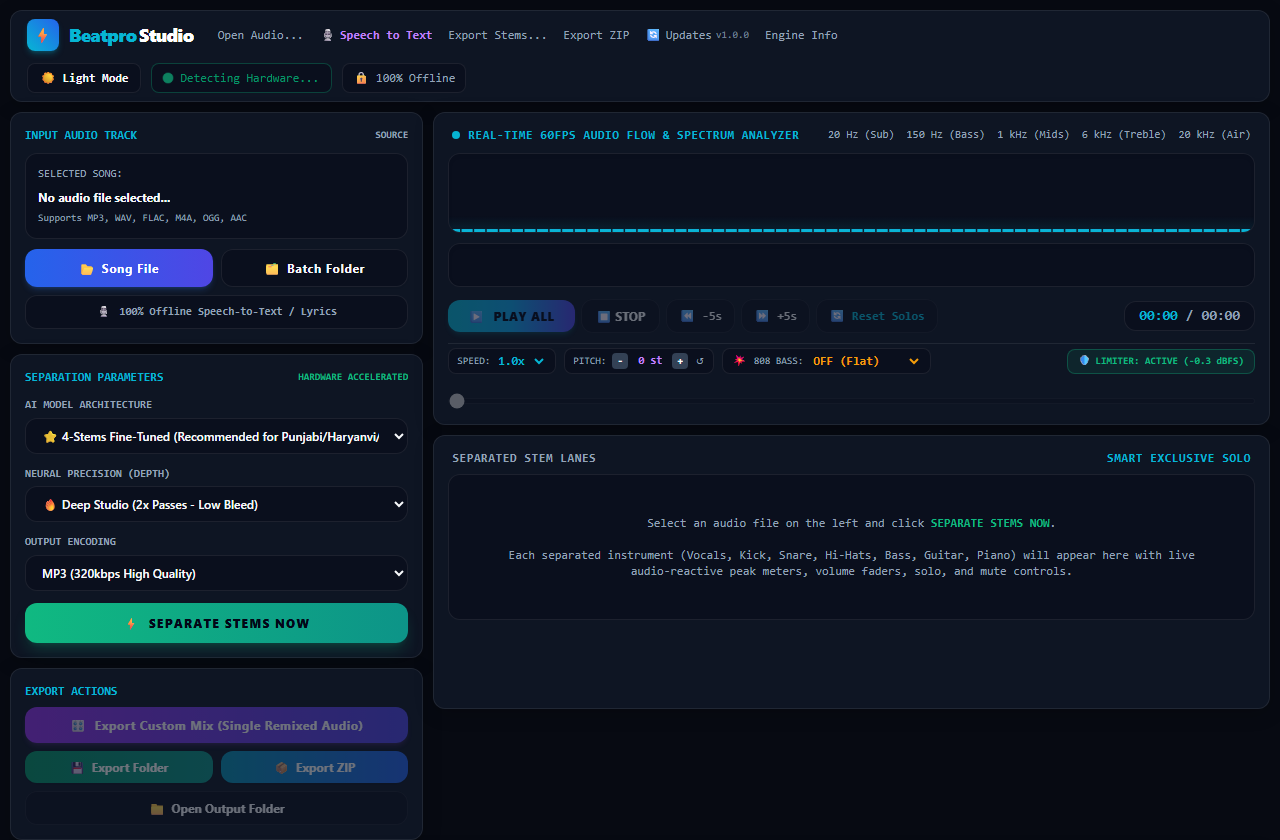
Move your cursor across the 3D deck, press Play Demo Groove, and toggle Solo, Mute, Volume, or +808 Bass Boost in real time using your browser's Web Audio engine.
Every tool a music producer, DJ, remix creator, or lyricist needs inside one fast offline desktop application.
Isolate Vocals, Drums, Bass, Guitar, Piano & Other using Meta Demucs v4 (htdemucs_ft, htdemucs_6s, and Karaoke Mode) — read our Meta Demucs v4 vocal isolation guide.
Break any Drum stem into isolated Kick (<140Hz), Snare (140Hz–4.5kHz) & Hi-Hats (>4.5kHz) in 32-bit float WAV — see why offline 32-bit splitters beat cloud limits.
High-precision 100% offline lyrics in Hindi, Hinglish, Punjabi & English, Hint Words, Auto-Sync Timings & export in our Desi .SRT & .LRC lyrics tutorial.
Adjust Volume, Pan, Speed (0.75x–1.5x), Pitch (±6 st) & 808 Sub-Bass with -0.3 dBFS limiting — check ideal MP3 vs 24-Bit WAV vs FLAC export settings.
Auto-detect tempo (65–185 BPM), Musical Key & Camelot Wheel across MP3, WAV, FLAC, M4A & OGG — explore our DJ mashup & Camelot Key workflow.
Use our overnight GPU batch stem queue guide to split full folders, plus built-in SHA-256 Auto-Update Center.
Standard speech tools choke on reverb and backing beats. StudioBeatPro strips reverb cleanly with Mel-Band Roformer before running local Faster-Whisper (large-v3) + Hinglish conversion — follow our Reels, Shorts & YouTube .SRT lyrics guide.
.TXT), Subtitles (.SRT), or Karaoke (.LRC)छण-छण होरी गेर में रै चाला पाट्या था देख उठगे होश गंडासा शानी काट्या था मद जोबन में चूर हूर वा परी हसीन रे धौला-धौला जम्फर धौले रंग पे तोड़ रे काढ़ कालजा लेगी रे वा थारे भाई का
Whether you produce on an NVIDIA RTX rig or a standard Intel/AMD laptop, StudioBeatPro automatically adapts.
Includes native CUDA 12.4 runtime & PyTorch GPU kernels out of the box. Automatically clears VRAM before each pass — read our overnight GPU batch stem queue guide.
No NVIDIA GPU? StudioBeatPro automatically switches to multi-threaded CPU mode (int8 quantized Whisper + CPU Demucs) — compare benchmarks in our RTX GPU vs Intel & AMD laptop guide.
Click any live capture from the actual Windows application below to inspect the Dark Mode mixer, Offline Lyrics Studio, and Light Mode interface.
StudioBeatPro is a free Windows 10/11 (64-bit) desktop application that runs Meta Demucs v4 neural models directly on your NVIDIA CUDA GPU (~15s/song) or multi-core Intel/AMD CPU (~1–2 min/song) to isolate Vocals, Kick, Snare, Hi-Hats, Bass, Guitar, and Piano locally with zero cloud upload limits.
Includes bundled FFmpeg/FFprobe, custom studio UI, 4-Stems Demucs checkpoints, and SHA-256 verified Auto-Updater.

Keep StudioBeatPro_Setup_v1.0.0.exe and both .bin files together in the same folder before setup — see our Windows SmartScreen, .bin & SHA-256 guide or Terms of Use.
Step-by-step guides on clean AI vocal removal, Deep Drum Splitting, Desi/Regional .SRT/.LRC lyrics, and GPU/CPU optimization.
Complete Windows workflow for clean acapellas, 6-stem isolation (Guitar & Piano), and zero-phase Deep Drum splitting (<140Hz Kick, Snare & Hi-Hats).
How Mel-Band Roformer Vocal Cleaning + Offline Faster-Whisper Large-v3 capture regional hooks — with 1-click Devanagari to Hinglish conversion.
No gaming RTX GPU? Learn how StudioBeatPro's automatic Multi-Threaded CPU fallback & int8 Whisper run reliably on standard Intel & AMD Windows PCs.
Match harmonic Camelot Keys (65–185 BPM), tweak stem speed/pitch (0.75x–1.5x, ±6 st), boost 808s without clipping, and export stems or ZIP mixes.
Turn Hindi, Punjabi, or English vocals into timed Devanagari or Hinglish .SRT files ready for CapCut, Premiere Pro, and DaVinci Resolve.
Use Karaoke 2-Stem Mode cleanly offline on Windows — adjust singing pitch (±6 st), keep a subtle guide vocal, and export watermark-free.
-1.bin and -2.bin — see our Windows SmartScreen, .bin & SHA-256 setup guide.version.json manifest, verifies the package SHA-256 checksum, and installs patches or new releases cleanly without overwriting your config.